Speed to lead: where inbound response time actually goes, and why approval isn’t the bottleneck
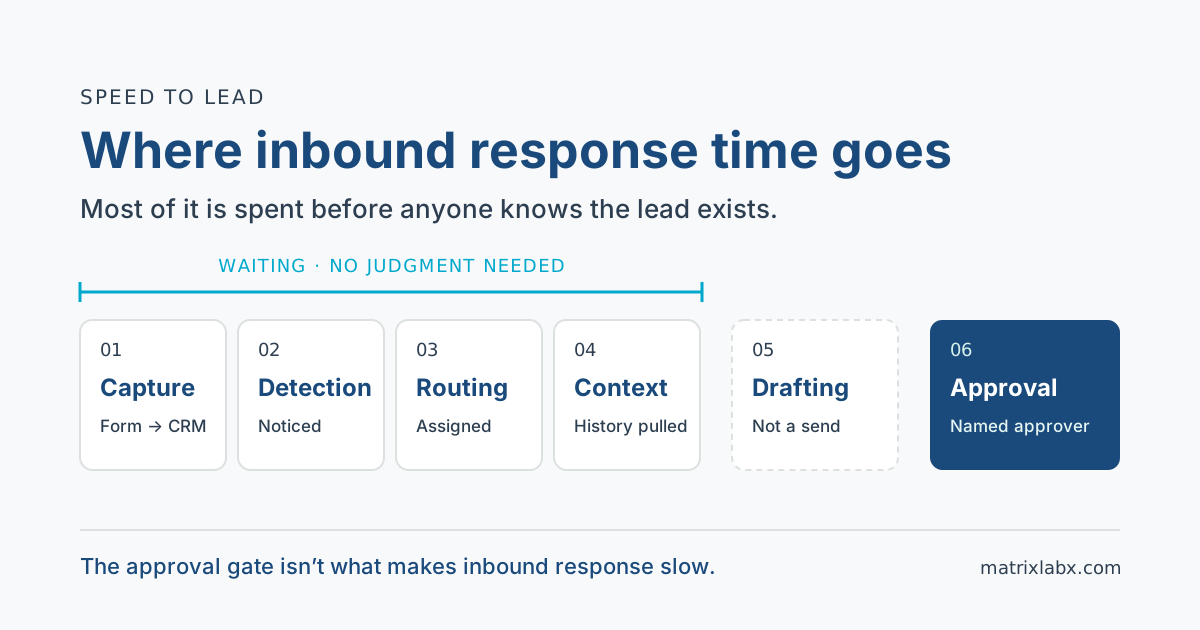
Speed to lead is the elapsed time between a buyer raising a hand (a demo request, a pricing-page form, a reply to a campaign) and your first relevant response. Most of that time is not spent writing or approving the reply. It is spent before anyone knows the lead exists: waiting to sync, waiting to be noticed, waiting to be routed, waiting for someone to look up the account. Fix those four stages and a human approval step stops being the thing that makes you slow.
What is speed to lead?
Speed to lead is the time from an inbound inquiry to the first response that reflects who the buyer is and what they asked. Two details in that definition matter more than they look.
- Clock time, not business hours. Buyers fill in forms at 9 p.m. and on Sundays. A metric that pauses the clock overnight measures your staffing, not the buyer’s experience.
- A relevant response, not an acknowledgment. An autoresponder that says “we received your request” is useful, but it is not a response. The clock stops when the buyer hears from someone, or something, that knows why they wrote in.
Report it as two numbers, never one: the median time to first relevant response, and the share of inquiries that never get one. Speed to first touch is also the first of the four metrics we argue predict pipeline in which SDR metrics actually predict pipeline.
Why does response time matter so much?
The research most speed-to-lead claims rest on is a 2011 Harvard Business Review article, “The Short Life of Online Sales Leads”, by James Oldroyd, Kristina McElheran, and David Elkington. It reports two findings.
Leads decay fast. In an analysis of 1.25 million leads received by 42 U.S. companies (29 B2C, 13 B2B), firms that tried to contact a prospect within an hour of the inquiry were nearly seven times as likely to qualify the lead, meaning a meaningful conversation with a key decision maker, as firms that waited even one hour longer. They were more than 60 times as likely as firms that waited 24 hours or longer.
Most firms are slow anyway. In an audit of 2,241 U.S. companies sent a web-generated test lead, 37% responded within an hour, 16% within one to 24 hours, and 24% took longer than 24 hours. The other 23% never responded at all.
Two honest caveats. The data is from 2011, and most of the analyzed leads came from consumer-facing companies. What holds up is the direction: intent decays while a lead waits. The exact curve for your own funnel is something you can measure from your own CRM, and the method is below.
The number worth sitting with is the 23%. That is not a speed problem. It is a coverage problem: leads that were paid for, captured, and never answered.
Where does the time actually go?
“We need to respond faster” is not actionable, because response time is the sum of six stages with different causes. Only the last one needs a person’s judgment.
| Stage | What happens | Where the delay comes from | Needs human judgment? |
|---|---|---|---|
| 1. Capture | The inquiry becomes a record in the CRM | Batch syncs and scheduled imports. The HBR authors named the practice of pulling leads from the CRM daily rather than continuously. | No |
| 2. Detection | Someone, or something, notices the record | Notifications to an inbox nobody watches after hours or on weekends. | No |
| 3. Routing | The lead gets an owner | Territory and round-robin rules, an owner who is out, an account that matches no rule. The HBR authors named distribution by geography and “fairness.” | No. Your team writes the rules once. |
| 4. Context | Who is this, is the account a customer, is there an open deal | Switching between the CRM, enrichment, and intent tools. | No |
| 5. Drafting | A first reply written for this buyer | The owner is busy with their own pipeline. The HBR authors named sales teams focused on generating their own leads over reacting to inbound. | Partly. The content needs judgment, but a draft is not a send. |
| 6. Approval and send | A named person signs off and the reply goes out | No approver available, no backup named. | Yes |
Stages one through four are pure waiting. Nothing in them requires anyone’s judgment. They require someone to be awake and looking. That is why speed to lead degrades exactly when inbound volume spikes, and every evening. Inbound fails on latency in a way outbound does not, a split covered in SDR vs. BDR vs. AE.
Your numbers only
Where does your response time go?
Enter a typical number of minutes for each stage, from your CRM timestamps or your best estimate. Nothing is stored and nothing is compared to a benchmark.
0 / 6 stages entered
Doesn’t human approval slow everything down?
This is the most common objection to governed AI agents, and it misplaces the delay.
In a rep-operated motion, approval was never a separate step: the rep who wrote the reply also sent it. The hours were lost in stages one through four, before the rep ever saw the lead. In a governed design, agents carry those stages as internal, reversible work: capture, detection, routing, assembling the account context, and preparing a draft grounded in what the buyer actually asked. Nothing has reached the buyer yet. The draft then waits for a named approver.
The human step shrinks to one decision: approve, edit, or reject. That decision takes little time when the context arrives attached to the draft. It is also the one step that should stay human, because it produces the first thing the buyer reads with your company’s name on it.
The approval gate isn’t what makes inbound response slow. The hours before anyone knows the lead exists are.
That moves the design question somewhere more useful: who is the approver at 7:40 p.m. on a Thursday, and who is the backup? An approval queue nobody staffs moves the bottleneck rather than removing it. It is the same trade we describe for outbound in how the approval queue works for Herald, PrescientIQ’s Outbound Engagement Rep.
Which inbound actions can run under policy, and which should wait for approval?
The framework is the one in human-in-the-loop vs. human-on-the-loop: set the oversight mode for each action class by where an error would land and whether it can be undone. The two modes are defined as follows.
Human-in-the-loop (HITL). The action is drafted and held. It does not execute until a named person on your team approves it.
Human-on-the-loop (HOTL). The action executes under a standing policy your team sets. A named person supervises and keeps intervention, override, and revocation authority.
Your team chooses the mode for each action class, based on its risk tolerance, and can change it at any time.
Every action, in either mode, is recorded to the audit ledger with its rationale, before-and-after state, and the approver or policy behind it.
Every action class starts in human-in-the-loop until your team changes it.
| Inbound action | Where an error lands | Where it can reasonably settle |
|---|---|---|
| Write the inquiry to the CRM and match it to existing records | Internal record, with before-and-after state | Can run under supervision once trusted |
| Notify the owner and a named backup | Internal person | Can run under supervision once trusted |
| Assign an owner by rules your team wrote | Internal assignment | Can run under supervision once trusted |
| Assemble account context and prepare a draft reply | Internal draft. Nothing reaches the buyer. | Can run under supervision once trusted |
| An acknowledgment your team wrote in advance | The buyer | Usually your form’s existing autoresponder, outside any agent |
| The first relevant reply to the buyer | The buyer and your brand | Held for a named approver |
Every record of what happened lives in one place: the audit ledger, which is also the evidence your team uses to decide when an internal action class has earned supervision instead of approval.
One boundary holds regardless of speed: a form fill authorizes a reply about what the buyer asked. It is not blanket permission for every channel, as we cover in a whitepaper download is not consent.
How do you measure speed to lead properly?
Most dashboards report one average from form fill to first activity. That number hides both the cause and the worst cases. Six changes make it diagnostic.
- Timestamp every stage. Inquiry received, record created, owner assigned, draft ready, approved, sent. The gap between consecutive timestamps tells you which stage to fix.
- Report the median and the slow tail, not the average. An average blends the lead answered in minutes with the one that waited all weekend. The 90th percentile shows the weekend.
- Use clock hours. Business-hours metrics hide exactly the gap you are trying to find.
- Track the no-response share separately. The HBR audit’s never-responded group is a coverage figure. It does not show up in a response-time average at all.
- Cut by hour of day and day of week. If the slow tail clusters in the evening and on weekends, you have a coverage problem, not a process problem.
- Build your own decay curve. Bucket last year’s inbound leads by response time and compare the qualification rate in each bucket. That is the HBR finding reproduced on your own data, and it tells you what a faster response is worth to you.
Ranking matters as much as speed: a fast reply to the wrong lead still wastes the approver’s time. The upstream half is how to build a B2B lead scoring model your reps trust.
What should RevOps change this quarter?
- Replace batch syncs with event-driven capture, so an inquiry becomes a record when it arrives, not at the next scheduled import.
- Notify an owner and a named backup, with an explicit rule for evenings and weekends.
- Give every routing rule a fallback owner, so a lead that matches no territory still has a name on it.
- Attach account context to the lead before anyone opens it: existing customer, open opportunity, prior conversations.
- Name an approver for every coverage window and set a target for time in the approval queue. Measure it separately from the other stages, so a slow queue is visible as a queue.
The marketing-to-sales handoff where inbound leaks is one of four seams covered in how to fix revenue leakage between marketing, sales, and customer success.
See where your own response time goes
Which of the six stages is costing you is a question about your own funnel, not a general one. The free Autonomous Audit Report (AAR) models it on your own CRM data: where inbound response time is spent today, which stages are coverage problems rather than effort problems, and what the governed alternative looks like before any commitment. It comes back as a written assessment within 48 hours of the intake session.
The broader argument, that execution capacity rather than software access is the constraint on mid-market revenue teams, is in what is digital labor.
Digital workers execute. Humans authorize.
Where the data runs
PrescientIQ is hosted and operated by MatrixLabX on Google Cloud. SOC 2, ISO 27001, and PCI DSS attestations are held by Google Cloud, which operates the underlying infrastructure. They are not MatrixLabX certifications. MatrixLabX application-layer SOC 2 is in progress.
Frequently Asked Questions
- What is speed to lead?
- Speed to lead is the elapsed time between an inbound inquiry, such as a demo request or a pricing-page form, and the first response that reflects who the buyer is and what they asked. Measure it in clock time, not business hours, and report it alongside the share of inquiries that never get a response.
- What is a good speed to lead for B2B?
- There is no universal target. The most-cited evidence, a 2011 Harvard Business Review study, found that firms contacting a lead within an hour were nearly seven times as likely to qualify it as firms that waited one hour longer. Treat that as direction, then set your own target from your qualification rate by response time.
- Does human approval slow down lead response?
- Human approval is rarely the slow step. Most response time is lost before anyone sees the lead: syncing, noticing, routing, and looking up the account. When agents handle those internal steps and attach the context to a draft, approval is one quick decision. The real risk is an approval queue with no named approver or backup.
- How do you calculate speed to lead?
- Calculate speed to lead per inquiry by subtracting the inquiry timestamp from the timestamp of the first relevant response, in clock hours. Report the median and the 90th percentile rather than the average, track the share of inquiries with no response separately, and timestamp each intermediate stage so you can see which one is slow.
- Should an AI agent reply to inbound leads automatically?
- That is your team’s decision for each action class. Recording the inquiry, routing it, and drafting a reply are internal and reversible. The first relevant reply reaches the buyer and cannot be undone, so it can reasonably stay held for a named approver. In PrescientIQ, every action class starts held for approval until your team changes it.
- Where does the 5-minute speed-to-lead rule come from?
- The 5-minute rule does not come from the 2011 Harvard Business Review article, which compares responding within an hour against an hour later and against 24 hours or more. Minute-level multipliers that circulate under the HBR name come from other datasets, so check the original source before quoting any of them in a plan.
Related Reading
Notes on the figures
The response-time figures on this page are third-party findings from Oldroyd, McElheran, and Elkington, “The Short Life of Online Sales Leads,” Harvard Business Review, March 2011. They are paraphrased, carry their original publication date, and are not MatrixLabX measurements. The six-stage framework, the action table, and the checklists are MatrixLabX’s own and are offered as a starting point, not as benchmarks. This page makes no claim about response times achieved by PrescientIQ.
Sources
- Oldroyd, J. B., McElheran, K., and Elkington, D., “The Short Life of Online Sales Leads,” Harvard Business Review, March 2011. hbr.org · BYU ScholarsArchive record
See where your own execution effort is going
The Autonomous Audit Report models where your team's execution capacity is currently spent, what your configuration is actually paying for, and what the governed alternative looks like on your own data — before any commitment.
Get your free AAR benchmark